CPPCrates
Solo developed a console based C++ game about opening crates and earning money, featuring interactable menus, moddable JSON backend, player data saves, and more.
Developed for a university module teaching C++ in a console-based environment, this game is a clicker/idle game where players click to earn coins, which can be used to buy crates that contain random items of varying rarities.
Some of the features of the game include:
- A crate shop that supports buying crates and viewing the contents of the crates
- A player coins balance that is updated when the player uses coin clickers or gets items from crates
- A moddable JSON backend that allows for easy additions of new crates and items
- A save/load system that allows players to save their progress and load back into the game at a later time
CPPCrates is a Windows console game where you buy and open loot crates with currency earned by clicking. All of the game's content (items, crates, prices, and drop tables) load from JSON 'mod' files at startup, and the entire menu tree is built at runtime from that data using callback-driven fields.
Features
- Arrow key and WASD driven menus.
- Save profile system where users create named profiles, or pick from a profile found on disk. Saves are automatically discovered and are labelled with username and creation date.
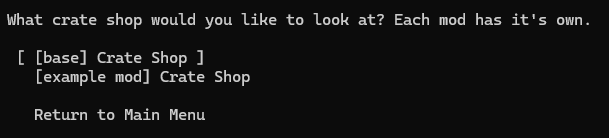
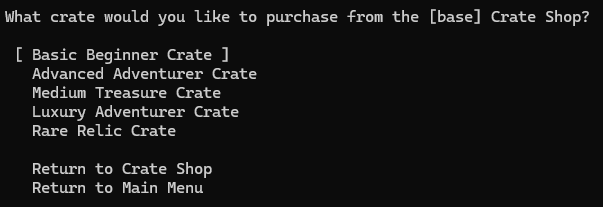
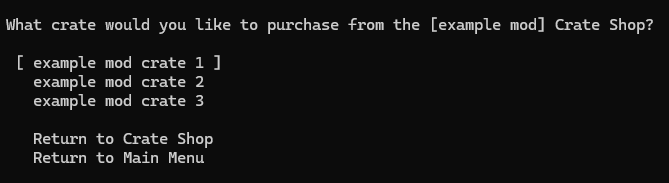
- Crate shop, one per loaded mod.
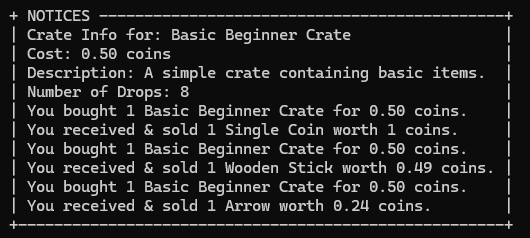
- Weighted random drops - each crate has its own drop table, where each item rolls a value inside a min/max range and is immediately sold for coins.
- Coin clicker with progress gates - +0.01 is always available, then +0.25, +0.50, and +1.00 are unlocked as the user performs more clicks.
- A live profile HUD and notices box, drawn side by side, with settings to toggle certain lines of information.
- Quit and save functionality.
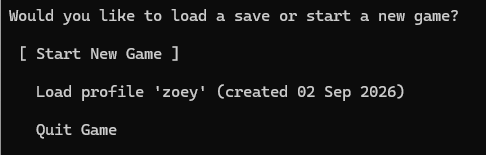
Menus
The whole UI is built from three structs. A Choice, a label with a callback, a ChoiceCollection, a visually grouped set of choices, and a Menu, which is a main question title and a list of collections - with its own selection information for that menu.
Menus are declared as data at startup, with callbacks attached using lambdas that capture whatever data they need by reference. This is the pattern that's used to build out the whole game.
ChoiceCollection quitCollection;
quitCollection.AddChoice("Force Save", [&mainMenu, ¤tPlayer]() {
DataHandler::SavePlayerAsJSON(currentPlayer);
MenuHandler::ShowSelector(mainMenu, true, currentPlayer);
});
quitCollection.AddChoice("Quit & Save", [¤tPlayer]() {
DataHandler::SavePlayerAsJSON(currentPlayer);
ConsoleUtils::CloseConsole();
});
Navigation is handled by using _getch(), which handles both WASD and arrow keys. It supports wrapping across multiple choice collections.
while (true) {
    char keyPressed = _getch();

    // If the key pressed is W or the up arrow key
    if (keyPressed == 72 || keyPressed == 119) {
        // If we are on the first choice in this collection, move to the last choice in the previous collection
        if (menu.selectedChoice == 0) {
            if (menu.selectedCollection == 0) {
                menu.selectedCollection = static_cast<int>(menu.collections.size() - 1);
            }
            else {
                menu.selectedCollection--;
            }
            menu.selectedChoice = static_cast<int>(menu.collections[menu.selectedCollection].choices.size() - 1);
        }
        else {
            menu.selectedChoice--;
        }
    }
    ...
    else if (keyPressed == 13) {
        Choice selectedChoice = menu.collections[menu.selectedCollection].choices[menu.selectedChoice];
        std::this_thread::sleep_for(std::chrono::milliseconds(100));
        selectedChoice.callback();
        break;
    }

    PrintChoices(menu, shouldShowPlayerProfile, player);
    std::this_thread::sleep_for(std::chrono::milliseconds(100));
}
The menu rendering function clears the screen and re-prints everything whenever the selected choice changes. The currently selected item is decorated with brackets.
if (menu.selectedCollection == collectionIterator && menu.selectedChoice == choiceIterator) {
    std::cout << "\n [ " << choice.text << " ]";
}
else {
    std::cout << "\n   " << choice.text;
}
Menus can also be edited at runtime, using Menu::RemoveChoice. This deletes a choice, deletes the collection if it becomes empty, and clamps the cursor so that it never ends up out of bounds if a selected option is removed.
Profile and notice log
Above the menu that displays all the choices are a profile and notice log box. These are drawn side-by-side, and they both automatically size to their longest line, ensuring that the shorter box is padded with extra spaces so that the taller one doesn't break the layout.
The rows that appear are driven by the user's settings.
bool isAtLeastOneLineVisible = false;
for (const std::string& lineKey : profileLinesOrder) {
    if (player.settings["visibility"][lineKey]) {
        isAtLeastOneLineVisible = true;
        linesToPrint.push_back(profileLines[lineKey]);
    }
}
...
for (std::string& line : linesToPrint) {
    int padding = profileInnerWidth - static_cast<int>(line.length());
    line = "| " + line + std::string(padding, ' ') + " |";
}

std::string borderLine = "+" + std::string(profileInnerWidth + 2, '-') + "+";
std::string profileTopBorderLine = "+ PROFILE " + std::string(profileInnerWidth - 8, '-') + "-+";
Here is the code that prints the two columns, which respects the boxes being different heights.
for (int i = 0; i < numberLinesToPrint; i++) {
    if (i < static_cast<int>(linesToPrint.size())) {
        std::cout << linesToPrint[i];
        std::cout << "   ";
    }
    else {
        if (isAtLeastOneLineVisible) {
            std::cout << std::string(profileInnerWidth + 4, ' ');
            std::cout << "   ";
        }
    }
    if (i < static_cast<int>(noticeLinesToPrint.size())) {
        std::cout << noticeLinesToPrint[i];
    }
    else {
        std::cout << std::string(noticeInnerWidth + 4, ' ');
    }
    std::cout << "\n";
}
Feedback to the player about the actions they're doing is sent through the notice log.
void AddNotice(const std::string& notice) {
    notices.push_back(notice);

    // Ensure that the notices list is kept to a maximum
    if (notices.size() > 10) {
        notices.erase(notices.begin());
    }
}
Mod support and data-driven content
All of the items, crates, prices, and drop rates are defined by the mod JSON files. None of it exists in C++. At startup, the game scans a mods/ folder and loads every JSON that it finds, which builds out the item registry, one crate shop per mod, and the crates in each shop from the data. The base game data is just shipped as a mod, basegame.json.
{
  "core": { "name": "base" },

  "items": {
    "1":  { "name": "Single Coin",   "description": "...", "minValue": 1.0, "maxValue": 1.0 },
    "13": { "name": "Health Potion", "description": "...", "minValue": 2.0, "maxValue": 4.5 }
  },

  "crates": {
    "begCrate": {
      "name": "Basic Beginner Crate",
      "description": "A simple crate containing basic items.",
      "cost": 0.5,
      "order": 1,
      "dropTable": { "1": 7, "2": 20, "3": 8, "4": 5, "5": 2, "6": 3, "7": 9, "8": 1 }
    }
  }
}

There are some design decisions with the mods that I want to highlight:
- JSON has no comment syntax and I needed a way to let people editing the files know information, as it could be edited by a non-programmer. Keys beginning with an
_ are ignored by the mod loader.
for (auto const& [key, itemJson] : modJson["items"].items()) {
    // If the first character of the key is an underscore, then skip this item as it is a comment
    if (key[0] == '_') {
        continue;
    }
    gameItems.RegisterItem(key, itemJson["name"], itemJson["description"],
                            itemJson["minValue"], itemJson["maxValue"], modName);
}
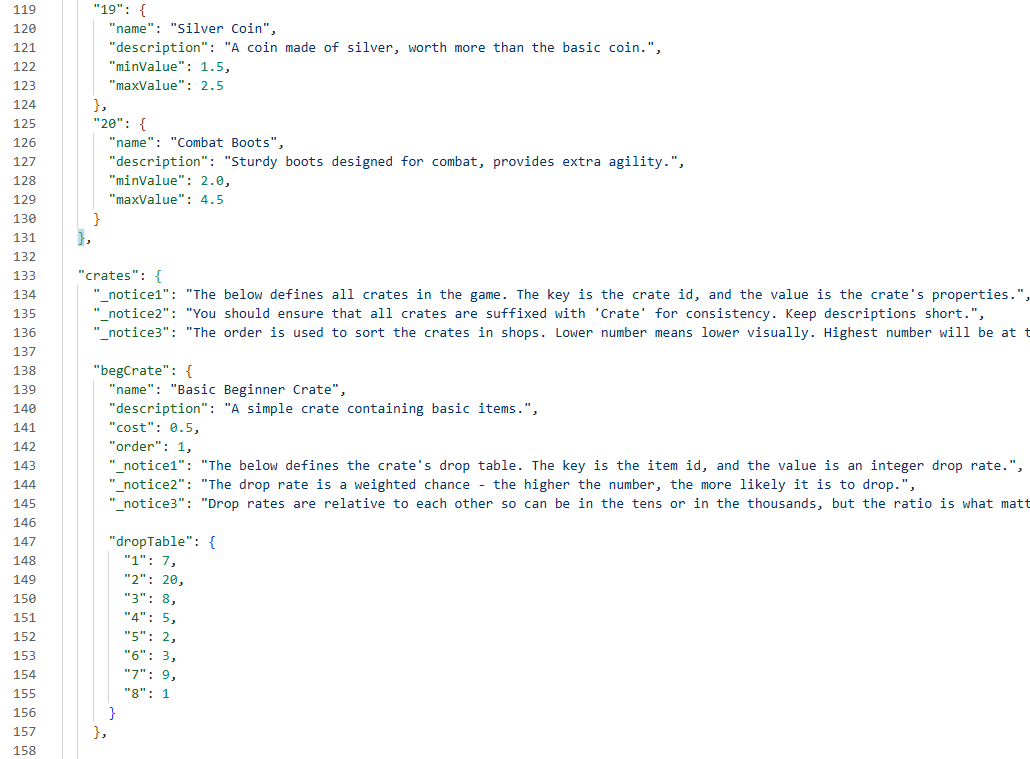
- Item IDs are named using the mod name, so that items can have duplicate IDs while ensuring maximum compatibility.
void RegisterItem(const std::string& id, const std::string& itemName, ...,
                    const std::string& modName) {
    Item tempItem = Item();
    tempItem.name = itemName;
    ...
    const std::string itemIdString = modName + "-" + id;
    tempItem.itemId = itemIdString;
    items[itemIdString] = tempItem;
}
- Duplicate mods are rejected, so the same content can't be loaded twice.
if (std::find(modManager.loadedMods.begin(), modManager.loadedMods.end(), modName) != modManager.loadedMods.end()) {
    std::cerr << "A mod with the name " << modName << " has already been loaded" << "\n";
    return;
}
Mods are found by iterating over the mods/ directory using std::filesystem::directory_iterator, filtered by .json extension. If there are no mods, the game doesn't crash and instead reports the result.
try {
    std::string currentDirectory = std::filesystem::current_path().string();
    for (const auto& entry : std::filesystem::directory_iterator(currentDirectory + "\\mods")) {
        if (entry.path().extension() != ".json") {
            continue;
        }
        modFiles.push_back(entry.path().filename().string());
    }
}
catch (const std::exception& e) {
    std::cerr << "Exception occurred: " << e.what() << "\n";
}
The main() loop turns the crate shop in each mod into a menu:
int nextCrateOrderIdToLookFor = 1;
while (true) {
    int cratesScannedForNextId = 0;
    bool foundNextCrate = false;

    for (auto& [crateId, crate] : modShop.crates) {
        cratesScannedForNextId++;
        if (!(crate.order == nextCrateOrderIdToLookFor)) {
            continue;
        }
        nextCrateOrderIdToLookFor++;
        foundNextCrate = true;
        // ... build this crate's submenu ...
    }

    if (cratesScannedForNextId == static_cast<int>(modShop.crates.size()) && !foundNextCrate) {
        break;
    }
}
Economy and weighted chance
Drop tables
Drop tables are defined by using a cumulative chance weight system. Mod authors can write whatever chances they want, all that matters is that the numbers are relative to one another.
std::string WeightedRoll() {
    int totalCrateItemWeight = 0;
    for (auto& [itemId, itemWeight] : items) {
        totalCrateItemWeight += itemWeight;
    }

    // Make a random roll between 0 and total weight
    const int rollThreshold = RandomUtils::GenerateRandomIntBetween(0, totalCrateItemWeight);

    totalCrateItemWeight = 0;
    for (auto& [itemId, itemWeight] : items) {
        totalCrateItemWeight += itemWeight;
        if (rollThreshold <= totalCrateItemWeight) {
            return itemId;
        }
    }
    return "";
}
All rolled items have a minimum and maximum sell value, so a second random roll is performed for each item.
float RandomUtils::GenerateRandomFloatBetween(const float min, const float max) {
    std::random_device rd;
    std::mt19937 gen(rd());
    std::uniform_real_distribution<> dis(min, max);
    return static_cast<float>(dis(gen));
}
const float crateRewardItemValue = RandomUtils::GenerateRandomFloatBetween(itemToReward.minValue, itemToReward.maxValue);
Crate purchasing
The crate purchase handles failure gracefully, alerting the user if they can't afford the crate, or if something went wrong trying to perform the roll or find the item it should reward. This ensures that an incorrectly set up mod file doesn't impact gameplay.
if (currentPlayer.coins < crate.price) {
    std::string costDifference = FormatterUtils::FormatFloatNumberWithCommas(crate.price - currentPlayer.coins);
    currentPlayer.AddNotice("You need " + costDifference + " more coins to buy " + crate.name + ".");
}
else {
    currentPlayer.coins = FormatterUtils::RoundToDecimalPlaces(currentPlayer.coins - crate.price, 2);

    std::string itemIdToReward = crate.WeightedRoll();
    if (itemIdToReward.empty()) {
        currentPlayer.AddNotice("Error occured rolling the crate. You have been refunded.");
        currentPlayer.coins = FormatterUtils::RoundToDecimalPlaces(currentPlayer.coins + crate.price, 2);
        return;
    }

    Item itemToReward = gameItems.GetItem(itemIdToReward);
    if (itemToReward.name.empty()) {
        currentPlayer.AddNotice("Error occured finding crate reward. You have been refunded.");
        currentPlayer.coins = FormatterUtils::RoundToDecimalPlaces(currentPlayer.coins + crate.price, 2);
        return;
    }
    ...
}
Coin clickers
The coin clickers are gated by lifetime clicks.
coinClickerCollection.AddChoice("+0.05 coins", [¤tPlayer, &coinClickerMenu]() {
int requiredClicks = 100;
if (currentPlayer.coinClicks < requiredClicks) {
int requiredClicksRemainingForUnlock = requiredClicks - currentPlayer.coinClicks;
currentPlayer.AddNotice("Use coin clickers " + FormatterUtils::FormatIntNumberWithCommas(requiredClicksRemainingForUnlock) + " more times to unlock this.");
MenuHandler::ShowSelector(coinClickerMenu, true, currentPlayer);
return;
}
...
});
Originally, I had scoped for crate item content to be held in an inventory. I did start with some inventory logic, but commented it out, due to time constraints and tightening the gameplay loop without bogging down the player in additional menus.
Persistence
Save files
Save files are JSON, with one file per profile in a saves/ directory.
std::string fileName = player.username + "_" + std::to_string(player.profileCreationTimestamp) + ".json";
std::filesystem::create_directory("saves");
std::ofstream playerFile("saves/" + fileName);
playerFile << playerJson.dump(4);
The player's settings became easy to serialise because I utilised nlohmann's json library and could save settings using playerJson["settings"] = player.settings;.
Loading is handled defensively, with every field being null checked so that any malformed information loads default values instead of throwing an error.
if (!playerJson["username"].is_null()) {
    player.username = playerJson["username"];
}
if (!playerJson["coins"].is_null()) {
    std::string coinsStr = playerJson["coins"].get<std::string>();
    player.coins = std::stof(coinsStr);
}
Save load menu
The menu to load a save slot is built from disk at startup. Every save is loaded, the username and timestamp is read and turned into a choice's label. If there are no save files, the game reports it as the menu still needs an entry.
if (saveFiles.empty()) {
loadGameCollection.AddChoice("No save files found", [&saveGameMenu, ¤tPlayer]() {
MenuHandler::ShowSelector(saveGameMenu, false, currentPlayer);
});
}
else {
for (auto const& [fileName, filePath] : saveFiles) {
loadGameCollection.AddChoice(fileName, [¤tPlayer, &mainMenu, filePath]() {
const Player loadedPlayer = DataHandler::LoadPlayerFromJSON(filePath);
currentPlayer = loadedPlayer;
MenuHandler::ShowSelector(mainMenu, true, currentPlayer);
});
}
}
Storing money
Money is stored as a float during gameplay, so every change is passed through a rounding function, RoundToDecimalPlaces, which rounds the float to two decimal places, as expected for currency.
float FormatterUtils::RoundToDecimalPlaces(float number, int decimalPlaces) {
    const float multiplier = static_cast<float>(pow(10, decimalPlaces));
    return static_cast<float>(round(number * multiplier) / multiplier);
}
Money is written into the save file as a string to ensure that the two decimal places are saved appropriately and to avoid any wackiness with floating point numbers.
// Ensure that the coins are formatted to 2 decimal places
// do ths by saving the coins as a string to avoid floating point issues
std::ostringstream oss;
oss.precision(2);
oss << std::fixed << FormatterUtils::RoundToDecimalPlaces(player.coins, 2);
playerJson["coins"] = oss.str();
Below you can see an example of a JSON save file, showing coins stored as a string, settings, and more.
{
    "coinClicks": 173,
    "coins": "55.00",
    "cratesBought": 0,
    "profileCreationTimestamp": 1788337682,
    "settings": {
        "visibility": {
            "coinClickerClicks": true,
            "coins": true,
            "cratesBought": false,
            "creationDate": false,
            "user": true
        }
    },
    "username": "zoey"
}
Input validation
Usernames are validated when the user makes a new save. As the username is used to store a file it has to ensure that the file path is valid, so I declare an allowed characters list, with the username input being validated and showing different errors messages contextually.
const std::string ALLOWED_CHARS = "abcdefghijklmnopqrstuvwxyzABCDEFGHIJKLMNOPQRSTUVWXYZ0123456789";
...
if (tempInput.empty() || containsOnlyWhitespace) {
    errorMessage = "You must enter a valid input.";
}
else if (containsAnyWhitespace && !allowWhitespaceInText) {
    errorMessage = "Your username can not contain any spaces.";
}
else if (containsIllegalCharacters) {
    errorMessage = "Your username can not contain any special characters.";
}
else if (usernameTooLong && lengthLimit != 0) {
    errorMessage = "Your username is too long, it can be up to " + std::to_string(lengthLimit) + " characters.";
}
Formatting
Included is a formatter utiltiies class that's used extensively to format things like numbers and timestamps into more readable formats.
std::string FormatterUtils::FormatIntNumberWithCommas(int number) {
    std::string strNumber = std::to_string(number);
    int insertPosition = static_cast<int>(strNumber.length() - 3);
    while (insertPosition > 0) {
        strNumber.insert(insertPosition, ",");
        insertPosition -= 3;
    }
    return strNumber;
}